Animating between poses on iPhone Duo
What iPhone Duo animates for you when it opens, shuts, turns and bends, the one change it leaves to your app, and how to animate that one. From frame-by-frame films of a real app.
 whitenOct 10, 2026 · Updated Oct 11, 202614 min read10 sources
Open iPhone Duo and the picture seems to stay where it is while the phone moves around it. That is the system’s work, and it raises the question every adapted app meets sooner or later: when the phone changes pose, what should the app itself animate? Apple’s guidelines have one rule about motion and no API for it. This page answers the question from films: Flicit, a SwiftUI app for collecting movie tickets, filmed frame by frame in Apple’s iPhone Duo simulator through every change of pose, before and after it learned to move.
The short answer is: very little, and only one thing. The guide to adapting an app for iPhone Duo with a coding agent has the tooling the films were made with; the poses guide has the poses themselves.
In short
- Opening, shutting and turning are the system’s. It hands your app between the displays under a blurred snapshot and turns it with its own rotation. Your app is resized underneath: land the new layout in one pass, keep the user’s place, and add no motion of your own.
- Bending the open phone is yours. The window keeps its size, nothing covers the change, and whatever your layout does at the crease, people watch it happen.
- The best bend moves nothing. Lay out on the fold before it bends, from the system’s inactive fold region, and a book pose changes nothing on screen.
- Where a pose has a layout of its own, animate the swap, and only on a bend: the crease turned active or resting while the window kept its size. Never key an animation to the pose itself, or it plays on top of the rotation.
- A view built for the new layout starts with empty images. Draw the bitmaps you’ve already decoded in its first frame, or every swap shows a placeholder.
- Film it. A screenshot can’t show a jump, a blank frame or a placeholder.
What the system animates for you
Opening and shutting
The system covers the hand-over between the cover and the inner display with a snapshot of the app, blurred as the phone moves. Empirical Health’s reconstruction of the effect describes content held still in space while the glass swings around it: sharp near the hinge, more blurred towards the moving edge, the inner display starting dark and brightening as it opens. The two displays share one aspect ratio, which is why the picture doesn’t jump.
Underneath, nothing is recreated. In Frank Schlegel’s notes from Apple’s Group Labs, a full-screen app “normally continues on the other display and is resized rather than destroyed and recreated”, and a reply on the developer forums, in Anton Gubarenko’s digest, puts it as “hinge and display transitions are represented as size-class and trait changes”. In Flicit’s films the app reaches its new layout in one step while the snapshot is still up. Nothing it does at that moment is seen, so an animation there buys nothing.
What the user does see is whether they are still where they were. That is the job here: the same screen, the same scroll position, the text they were typing.
Turning
Turning the open phone between sideways and upright is a rotation, and the system animates it. Flicit’s Library was laid out in its upright form by the time the rotation finished. One thing moved afterwards: turning back sideways, its tab bar faded out as the side rail faded in, a short hand-over after the rotation rather than motion on top of it. That reads well. A spring keyed to the pose, starting while the system is still rotating the window, would not.
Bending
Fold the open phone part way and the window keeps its size. There is no snapshot and no rotation: the only change is that the crease’s region turns from resting to active, and whatever your layout does about it happens in plain view. In the simulator the leaf that tilts away blurs and darkens while the hinge moves, and clears the moment the hinge stops.
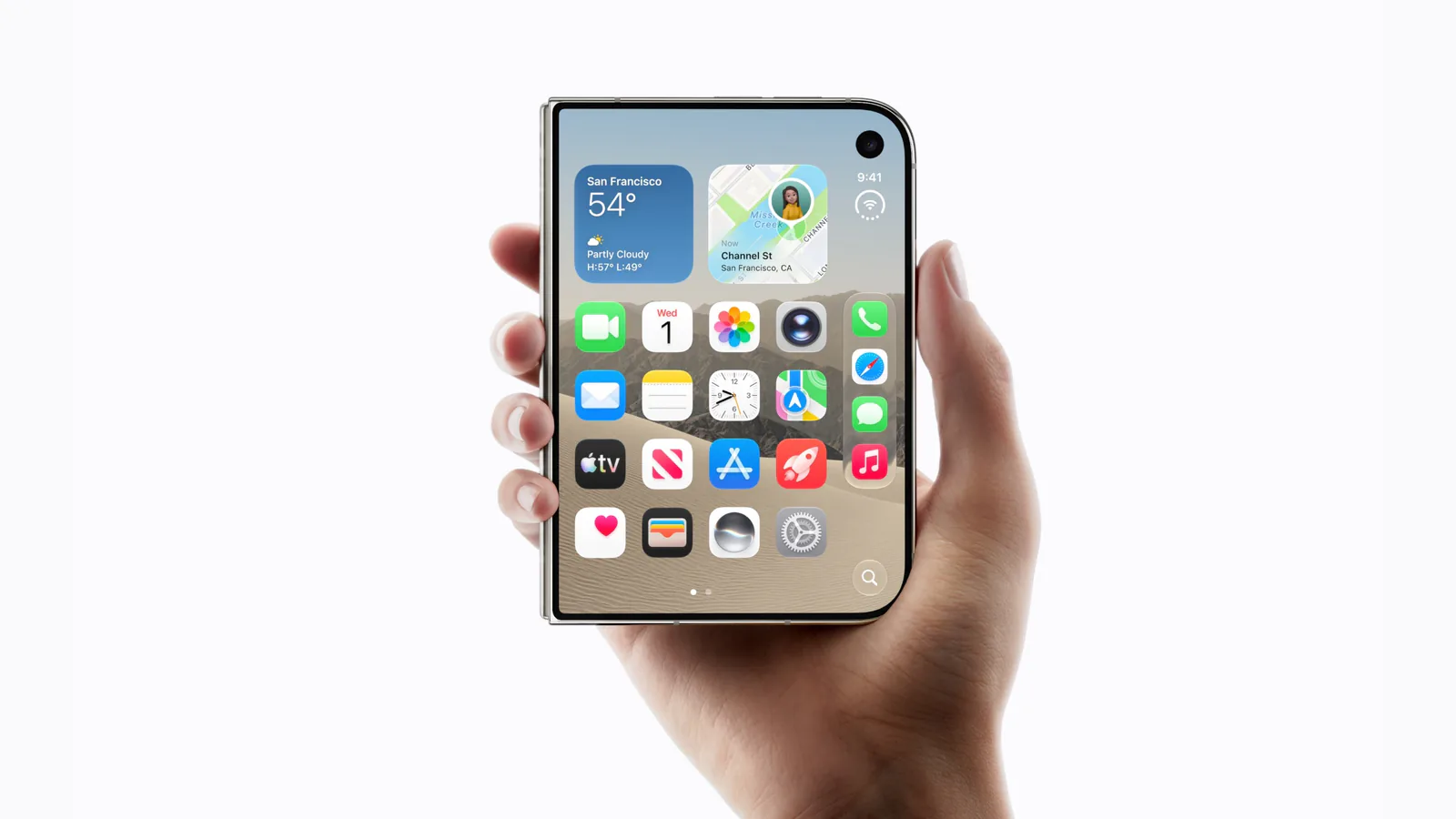
The system’s own components already move for a bend. Alerts, menus, popovers and sheets reposition themselves around the fold, and split views even out their columns. The rest is yours.
Apple’s rule: small adjustments
The Human Interface Guidelines say it once: “Avoid extreme layout changes as people fold the device. Move only what’s necessary to keep elements visible and easy to tap. Controls that disappear or shift dramatically are harder to find and track, so favor small adjustments over rearrangement.”
The layout talk fills it in, under the name displacement. Move an element to the region that suits its purpose, not far from where it was, because distance breaks the link between the two. Move related things together. Leave continuous scrolling content (articles, feeds, documents, lists) where it is, because moving it “can interrupt continuity”. Even the direction is chosen: part folded like a book, alerts go to the trailing side, “closer to where they’ll appear as the device closes”.
Two more facts bound what an animation can be. Hinge data is “ideal for driving interactions or effects”, and layout belongs to the region and arrangement APIs. And there is no API for animating a change of pose. onHingeChange reports a status and an angle, with no speed; the only fold API that takes an animated: flag is UIKit’s UIArrangementViewController, for switching arrangements yourself.
The best bend moves nothing
Flicit’s first films caught one thing moving that wasn’t the system’s: on the bend, the Library’s ticket list jumped sideways onto the crease as the crease turned active, and back when the phone lay flat again. The fix was not an animation. Ask for the fold region with .includeInactive and the system reports where the fold will run while the phone still lies flat, so a two-pane row can put its gutter there from the start:
let divisions = proxy.reservedRegions(kind: .division, options: .includeInactive)
let crease = divisions.first { $0.isActive }?.frame            // part folded
    ?? divisions.first { !$0.isActive }?.frame                 // flat: where it will bend
With the gutter on that line in both poses, Flicit’s sideways bend now films as nothing but the system’s blur. The fold guide has the API, and the agent guide’s book-pose section the checks that keep a stale region from a turn out of the layout. Do this wherever you can: the smallest adjustment is none.
Animate the bend, and only the bend
Some poses earn a layout of their own. Stand the open phone upright and fold it to about 110° and Flicit’s ticket page becomes two: the ticket in its landscape form on the raised half, its pages turning on the flat half below. The film page splits the same way, the poster and the overview up, the rating and the actions down.
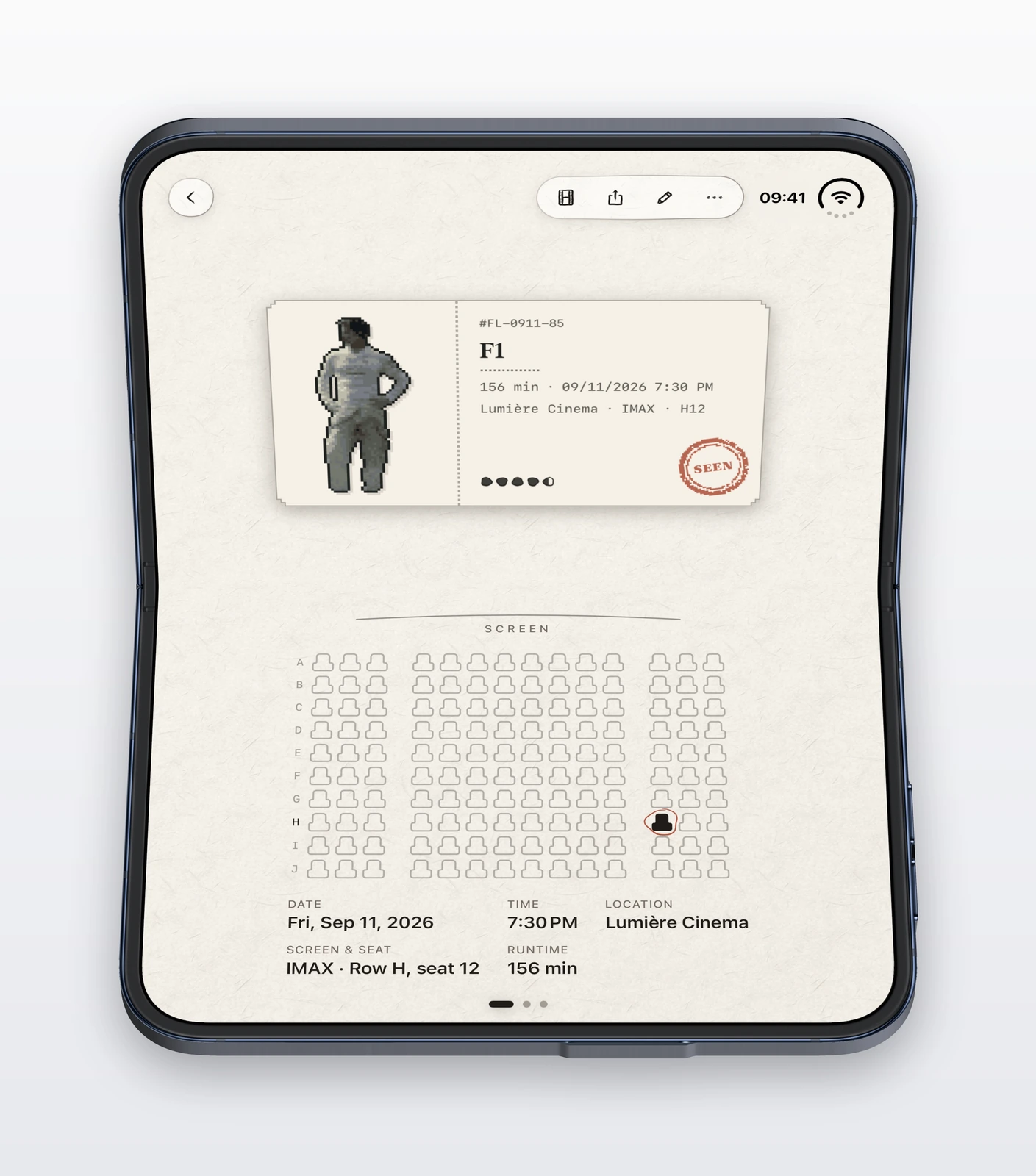
Before any motion was added, both pages cut from one layout to the other in a single frame, in both directions. That is the kind of change the guidelines warn about, but the laptop layout earns its place: on the raised half, the ticket in its landscape form has about three times the area a portrait ticket would. What can be softened is the change itself.
The question is when to animate. The pose changes in several ways, and only one of them is uncovered. Opening, shutting and turning all resize the window; a bend doesn’t. So the test for a bend is the crease turning active or resting while the window keeps its size. Measure the window as the tracked view plus its insets, because a bend may hand an inset to the page. The first reading is not a bend either: the fold regions arrive after the first layout pass, and animating them would slide the page in at launch.
struct FoldStage: Equatable {
    var seam: CGRect?               // the active division region; nil lying flat or shut
    var contentSize: CGSize = .zero // the tracked view, inside the insets
    var insets = EdgeInsets()

    var windowSize: CGSize {
        CGSize(width: contentSize.width + insets.leading + insets.trailing,
               height: contentSize.height + insets.top + insets.bottom)
    }

    /// The crease turned active or resting while the window kept its size.
    func isBend(to next: FoldStage) -> Bool {
        (seam == nil) != (next.seam == nil) && windowSize.width > 0
            && abs(windowSize.width - next.windowSize.width) <= 0.5
            && abs(windowSize.height - next.windowSize.height) <= 0.5
    }
}
Read the stage in one place, at the root of the window, and decide there whether a new reading is animated:
@Environment(\.accessibilityReduceMotion) private var reduceMotion

func publish(_ next: FoldStage) {
    guard next != stage else { return }
    guard stage.isBend(to: next), !reduceMotion else {
        stage = next                    // opening, shutting, turning: the system's
        return
    }
    withAnimation(.interpolatingSpring(mass: 0.9, stiffness: 280, damping: 24)) {
        stage = next
    }
}
Every view below reads the stage from the environment, and the ones that change layout for the pose pick up the bend’s animation without knowing about it. A page that switches with if let leaves = … { laptop } else { pager } gets SwiftUI’s default transition, a fade, so the two layouts crossfade. Flicit’s ticket now takes about 120 milliseconds from one to the other, both ways.
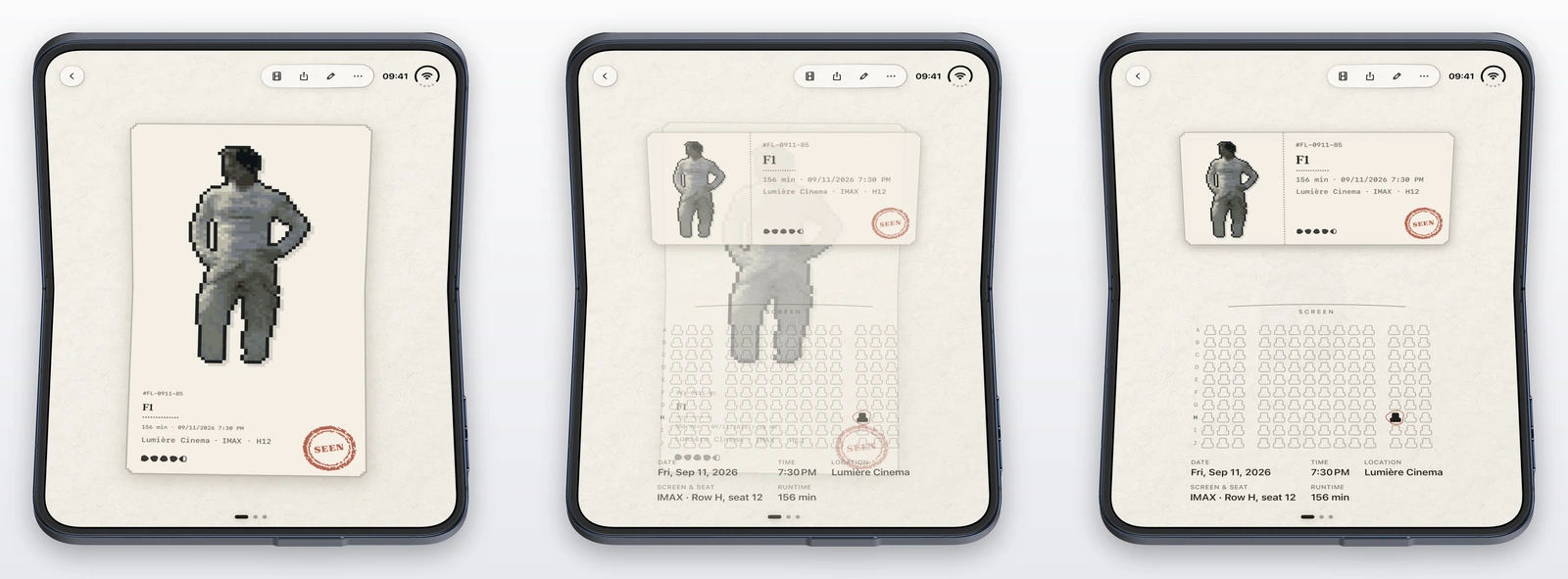
Decide at the source, not in the views. An .animation(_:value:) keyed to the pose fires whenever the pose changes, including a turn while the phone is bent, where it plays on top of the system’s rotation. Flicit’s films of a turn from the book pose into the laptop pose show the laptop layout landing in one step at the end of the rotation, which is right.
Draw what you’ve already decoded
The crossfade exposed a second fault the cut had hidden. The layout that comes in is built afresh, and its images start empty. Even when the picture is already decoded, an image view that loads asynchronously shows its placeholder for a frame or more, then fades the picture in. On Flicit’s films that was the ticket stub drawn black and the film’s poster grey, for 60 to 100 milliseconds, every bend.
Keep the bitmaps your image views last drew in a small cache the view can read synchronously, and look there before showing a placeholder:
- By the exact request first: the same file at the same pixel size and scale decodes to the same pixels, so the new view can draw it in its first frame without anyone noticing a difference.
- Then by picture: the largest decode of the same file stands in until the view’s own decode lands, as long as it is at least half the size asked for. A size nobody has drawn yet, like the stub the first time the phone bends, would otherwise still flash. A moment’s softness reads better than a placeholder.
- Let the view’s own load run anyway, and replace the stand-in without a fade, since it is the same picture.
If something reads the bitmap’s pixels, check it survives a stand-in. Flicit’s poster ticket takes its label colour from the poster, sampled at 24 by 24 pixels, so the same picture at another size gives the same colour; on film, the label didn’t change when the exact decode replaced the stand-in. With the cache in place, no swap in Flicit’s films shows a placeholder, first time or later.
This helps the whole app, not just the fold: any view rebuilt for an image already on screen draws it at once.
When a crossfade blinks, cut
Flicit’s film page did not crossfade like the ticket. Its outgoing layout disappeared in one frame instead of fading, and on the way back to flat the incoming page then faded in over bare paper: two or three frames, about 40 milliseconds, of an empty page. An ease-out curve, which shows the new page sooner, didn’t remove it. Both of the page’s layouts are built on scroll views, and the ticket’s pager, laid out by hand, fades out properly; that is as far as the films go, not a cause.
A blink is worse than a cut. The film page opts out of the bend’s animation for its own swap and changes in one frame, with its poster already drawn:
.transaction(value: isLaptopLayout) { $0.animation = nil }Film every page that switches layout for a pose. A crossfade on one page doesn’t promise one on the next.
Motion that follows the hinge
Everything above is a change between two states. Some motion should follow the hinge continuously instead: a sheet that leans with the raised half, a stub that lifts as you bend. That is what the angle is for. The system promises no “update frequency, angle increment, range, or precision” for onHingeChange, according to the forum replies Gubarenko collected, so treat each update as a change of state, not as the frames of an animation. Where an effect needs to look smooth, another reply suggests “driving a spring animation toward the latest angle”. Flicit leans the ticket stub on the raised half a few degrees with the angle through a soft spring, and keeps it upright under Reduce Motion. The hinge guide covers reading the angle as a position, a speed or a snap.
Keep the user’s place
Motion is the visible half of a pose change; the other half is that nothing is lost. The forum replies and the Group Labs agree. Keep view identity and data flow stable through a change of geometry. Don’t debounce: treat “reserved regions, safe areas, and bounds” as “ordinary inputs to the declarative UI”. And mind if branches on size class, which “can destroy local view state during display transitions unless shared state has been lifted above those branches”. The open-source meow-ios app moved the state of one section up to a stable ancestor for exactly this reason: the section changes container on a fold, which would have reset it and popped a pushed screen.
Flicit’s film page shows the limit of swapping layouts: its two layouts are different scroll views, so the position you had scrolled to doesn’t carry across the swap.
Film it
Screenshots show where a layout lands. They can’t show a jump, a blank frame, a placeholder or a stray animation, which is where all of the faults on this page were. The agent guide’s kit films a panel of the simulator through a scripted bend:
python3 duo.py orient upright
python3 duo.py record --out films/ --name laptop path:1.0:180:110 wait:2.5 path:1.0:110:180 wait:2   # into the laptop pose and back
ffmpeg -i films/laptop-inner.mp4 -fps_mode passthrough -enc_time_base 1/1000 -frame_pts 1 frames/%06d.png
The recorder writes a frame only when the panel changes, so extract them as they are; each file is named after its time in milliseconds. To find the moments worth looking at, compare each frame with the one before and sort by the difference. A hard cut is a single large step, and a crossfade a run of small ones:
prev=; for f in frames/*.png; do
  [ -n "$prev" ] && echo "$f $(compare -metric RMSE "$prev" "$f" null: 2>&1)"; prev=$f
done | sort -t'(' -k2 -g -r | head
Then look at the frames around each one. Check for a layout that moves after the system’s blur, a placeholder where a picture was, a blank frame between two layouts, and anything that moves during a rotation. Film before you change anything too, so you know which motion was already there.
Two habits of the simulator matter here. The crease turned active about a second after the hinge stopped, so in a film the swap comes after the bend, not during it; on the hardware it may well come mid-bend, with a hand still moving the phone. And after a turn the region can take a few seconds to settle: one of Flicit’s films ended with the bent phone back sideways and the laptop layout still showing, and a still taken a few seconds later had the right one. Give a film a long enough tail before calling what it shows a bug.
Quick reference
| Change of pose | What moves it | What the app does |
|---|---|---|
| Shut ↔ open | The system’s blurred snapshot | Land the new layout in one pass; keep the user’s place |
| Sideways ↔ upright | The system’s rotation | The same; nothing keyed to the pose |
| Flat ↔ part folded | Nothing: the app’s change shows | Move nothing if you can; otherwise animate the swap |
| The hinge moving | Nothing | Effects only, following the angle through a spring |
| Goal | What worked |
|---|---|
| Keep a book pose from moving | gutters on the inactive division region (.includeInactive) from the start |
| Tell a bend from the rest | the crease turned active or resting, and the window (content plus insets) kept its size |
| Animate a bend | decide where the stage is published: withAnimation for a bend only, nothing under Reduce Motion |
| Crossfade a page’s two layouts | an if/else on the pose; the bend’s transaction gives it the default fade |
| No placeholder in the new layout | draw a cached bitmap in the first frame: the exact request, else a decode at least half the size |
| A page whose crossfade blinks | .transaction(value:) { $0.animation = nil }: cut, with the images ready |
| Find the jumps in a film | frames with -fps_mode passthrough, then compare -metric RMSE frame to frame |
Limits of this guide
Everything here was filmed in Apple’s iPhone Duo simulator, iOS 27.1 (24A94232), and iPhone Duo reaches stores on October 23. The system’s fold effect on the hardware will look different from the simulator’s blur, and the crease may turn active mid-bend rather than a second after it, so a crossfade tuned on films may feel too quick or unnecessary in the hand. Why the film page’s scroll views drop out instead of fading is unexplained. The timings are one app’s, on one Mac: 120 milliseconds for the ticket’s crossfade, 60 to 100 for the placeholders before the fix.
Keep reading
iPhone Duo app ideas: 6 things builders are doing with the fold
Over 300 demos, concepts and prototypes for iPhone Duo, sorted into the six patterns that keep coming up, from the half-folded laptop to the hinge as a controller. A starting point if you're deciding what to build.
Split View on iPhone Duo: two apps side by side
iPhone Duo is the first iPhone that can show two apps at once. How Split View works, what its limits are, and which apps are built to share the screen.

iPhone Duo poses: closed, open, book, standing and Split View
A plain-language guide to the ways you will hold iPhone Duo, what the phone itself does in each, and the apps and ideas that make the most of them. For anyone buying one, and for anyone building for it.